
New: actual textured background + giraffe test →
One scene · An early phone test
A little celebration.
Your real world.
Try a simple balloon arch with a pedestal and balloon set forward to one side. Leave the middle open for a person, and keep your actual room around the decorations.
Start the iPhone test ↓Free · no app install or sign-up · no photo upload
Technical test, not finished party artwork or a promise of photorealism.
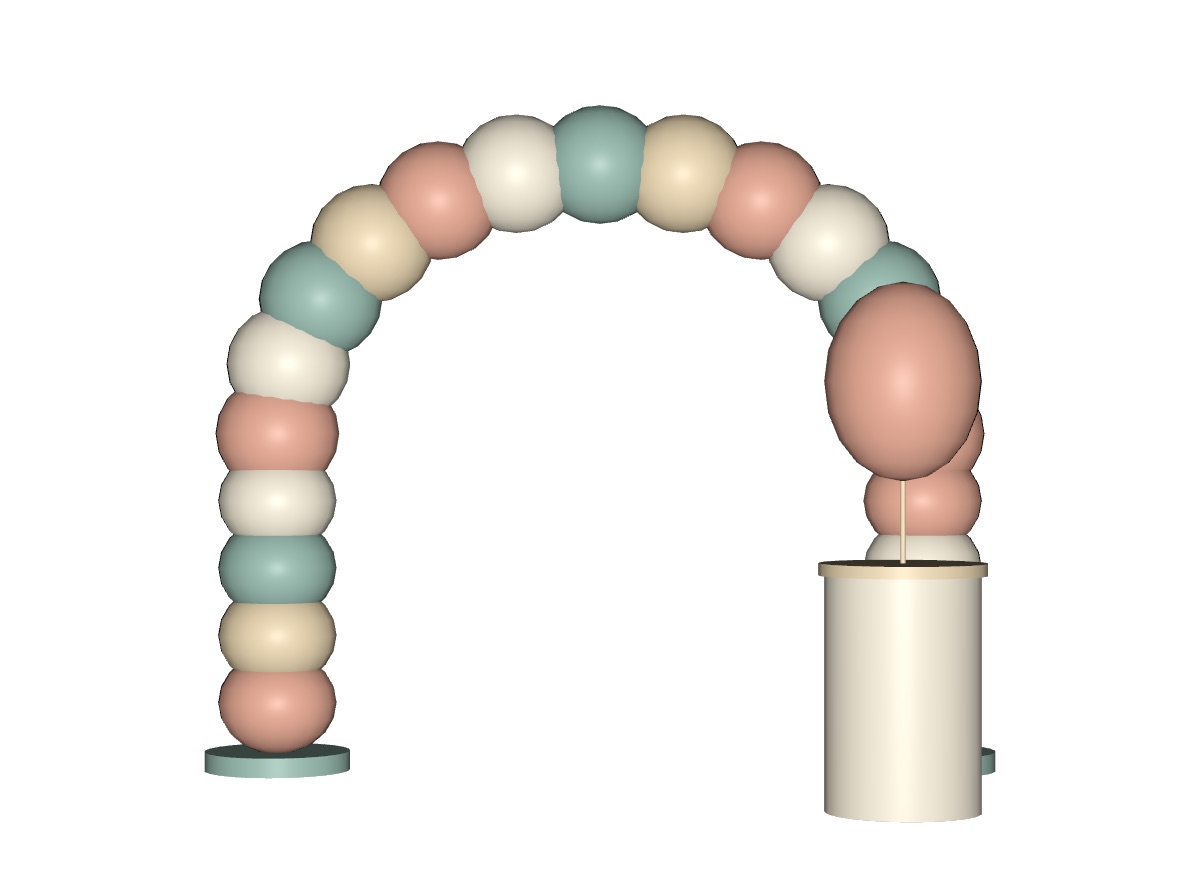
Try it with a person in the picture.
Open this page in Safari on an iPhone 13 (initial test target). Use the rear camera with someone else taking the photo. Allow about 3 m of clear floor width and room to step back.
- Place the whole scene.
Tap the arch image above. Choose AR if needed. Slowly scan the floor until the arch sits on it. Move or rotate the entire scene; the pedestal stays with it. The arch is about 2.5 m tall. This link keeps the authored scale. - Pose and move.
Stand in the empty center, about half a metre in front of the rear arch. The pedestal sits about 1.2 m forward of the arch, on the right. Take a slow step left and right with the phone. Check that the prop shifts against the arch and the person appears in front of the rear balloons. - Capture and check.
Tap Quick Look’s shutter for a photo; use its save/share controls if shown. Check the result in Photos. Look at hair, hands, floor contact and lighting. If camera mode, person layering or saving fails, record that as a failed test.
Start with soft, even daylight or a well-lit room; avoid strong backlight. The model uses simple matte materials with no dramatic baked lighting. Quick Look handles its appearance in your environment, but matching a real person is still something to judge in the saved photo.
Ready for testing: single floor-placed scene, metre scale, validated USDZ.
Not yet phone-verified: person occlusion, floor stability, parallax, lighting match, shutter and saving. This preview does not prove any of those.
Files & other devices
The USDZ route uses Apple AR Quick Look on compatible iPhones and iPads. It needs no LiDAR. On a Mac it is a 3D preview. The GLB preview below is 3D only, without a camera; it does not test AR or person occlusion. Android AR is not provided or verified in this test.
Explore the scene in 3D only
Drag to orbit; pinch or scroll to zoom. This is the same layout as the USDZ.
Open this section to load the 3D preview.
An ordinary room is the test.
Start with the space you actually have. A plain wall and even light can help the picture, but this freestanding scene does not require a blank wall.
How much space does this scene use?
The model is 2.94 m wide, 2.47 m high and 1.75 m deep. A proposed starting setup is roughly 3.2 m × 2 m of clear floor, at least 2.5 m of headroom, and additional space for the photographer to step back. These are planning dimensions, not phone-validated minimums.
The posing area is the empty center, about 1.2 m across and half a metre in front of the rear arch. Keep the person behind the forward pedestal. The AR launch uses fixed real scale; if the room cannot fit it, this full-size scene is unsuitable there. The 3D preview still works.
How big does the wall have to be?
No wall is needed for anchoring. Quick Look looks for a horizontal surface, and you place this whole scene on the floor. Your existing wall, windows and room remain visible through the arch. A quieter background is a photo suggestion, not a tracking requirement.
What if a sofa, table or other furniture is in front?
Furniture stays in the real camera image. This test does not remove it, move it, or reliably put virtual decor behind it. Do not expect iPhone 13 Quick Look to map every object or segment furniture correctly. People occlusion is a different capability and also needs testing here. Use a clear patch of floor; do not place the pedestal through a chair or the arch through a ceiling.
Does it read the room automatically?
It estimates a surface and tracks camera motion so you can place the model. It does not redesign the room, automatically fit the arch around furniture, or verify safe walking space. A LiDAR scanner is not required. Reflective floors, low light, blank surfaces and cramped camera movement may make placement less reliable.
How should we test a small or cluttered home?
Try an ordinary room first, with its normal furniture and light. Keep a clear walking path. If there is enough room for the authored scene, place it, pose, move the phone slowly sideways, and save a photo. Note visible furniture overlap, tracking drift, clipped decorations, mismatched lighting and rough edges around the person. If there is not enough room, record “does not fit”; do not treat the 3D preview as a successful AR test.
Then, if practical, compare with a clearer floor patch and softer light. The comparison tells us whether the scene works in everyday conditions or only in a prepared spot. No photo needs to be uploaded.
What this test is checking
One original procedural scene: 29 meshes, 7,392 triangles, no textures. Bounds: 2.94 m wide × 2.47 m high × 1.75 m deep. Ground level is zero; all parts share one placement. The center has no virtual floor or wall to cover the real room.
Apple documents web Quick Look, people occlusion on A12 and later, and camera recordings. That is platform evidence, not a successful test of this asset on your phone. See Apple’s Quick Look session. Other platforms have different requirements; Google describes AR versus 3D fallback.